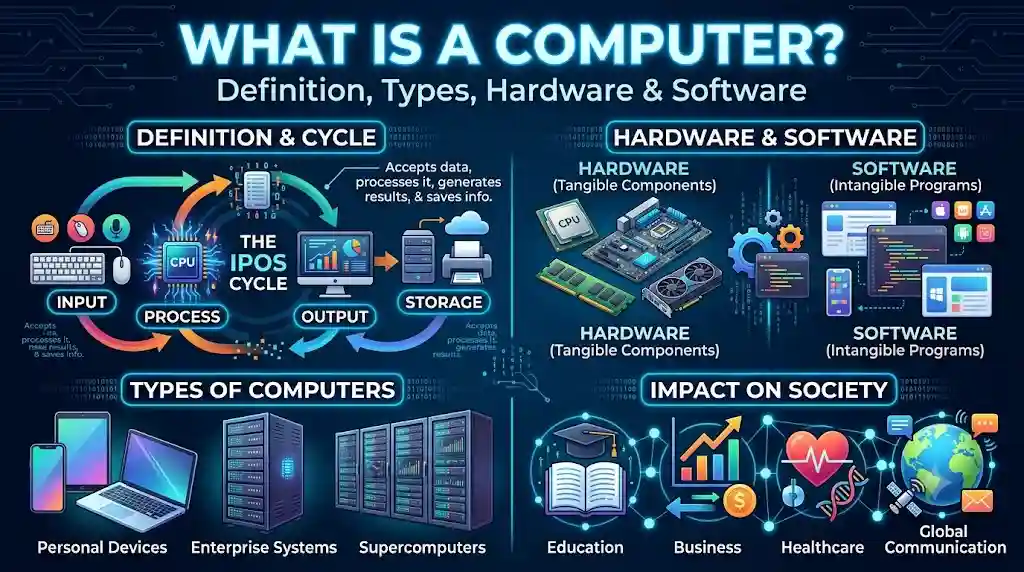
What Is a Computer? Definition, Types, Functions, Hardware and Software
A computer is one of the most important inventions in modern technology. It has transformed the way people learn, work, communicate, conduct business, manage information, and solve complex problems. From desktop computers used in offices to smartphones carried in our pockets, computing devices have become an essential part of everyday life.
Understanding what a computer is, how it works, and the difference between hardware and software provides a strong foundation for learning computer science. These fundamental concepts help students, beginners, and technology enthusiasts understand how digital devices perform tasks and process information.
Definition of a Computer
A computer is an electronic device that accepts data as input, processes it according to a set of instructions, stores data and information, and produces meaningful results as output.
Computers perform these operations using a combination of physical components and software programs. They can execute calculations, organize information, display images, play audio and video, communicate over networks, and automate numerous tasks with speed and accuracy.
For example, when you use a calculator application on a computer, you enter numbers and mathematical operators. The computer processes the input according to the instructions provided by the application and displays the result on the screen.
Similarly, when you type a document, browse a website, edit a photograph, or watch a video, the computer processes data and performs specific operations to produce the expected outcome.
In simple terms, a computer is an electronic device that takes input, processes data, stores information, and generates output according to programmed instructions.
How Does a Computer Work?
A computer works by accepting input, processing data, producing output, and storing information when necessary. These activities are commonly explained through the input-process-output-storage model.

1. Input
Input is the data or instructions supplied to a computer. Users provide input through devices such as keyboards, mice, touchscreens, microphones, scanners, and cameras.
For example, typing your name into a document is an input operation. The computer receives the characters and makes them available for processing.
2. Processing
Processing is the operation of converting input data into useful information. The central processing unit (CPU) executes instructions and performs arithmetic, logical, and control operations.
For example, when you calculate the total cost of several products, the processor executes the required instructions to obtain the result.
3. Output
Output is the information produced after processing. Computers present output through devices such as monitors, printers, speakers, and headphones.
For example, a monitor displays the result of a calculation, while a printer can produce a physical copy of a document.
4. Storage
Storage allows a computer to retain data, programs, and information for future use. Data can be stored temporarily in memory or saved for longer periods on storage devices.
RAM stores data that the computer is actively using, while SSDs and hard disk drives (HDDs) can preserve files and applications even when the computer is turned off.
These four stages work together to enable computers to perform simple and complex tasks efficiently.
Main Characteristics of a Computer
Computers possess several characteristics that make them useful in education, business, scientific research, communication, and entertainment.
1. High Speed
Computers can perform millions or billions of operations per second, depending on their hardware and workload. Tasks that might take humans hours to complete manually can often be completed by computers in seconds.
For example, a computer can calculate thousands of mathematical expressions or search a large collection of digital records in a short period.
2. Accuracy
Computers can produce highly accurate results when they receive correct data and execute appropriate instructions. However, incorrect input, software defects, or hardware problems can lead to incorrect results.
This is why data quality and proper programming are important in computer operations.
3. Automation
Computers can automatically perform tasks once they have been programmed or configured. Automation reduces the need for repeated manual work.
For example, accounting software can calculate totals, generate reports, and organize financial transactions automatically.
4. Storage Capacity
Computers can store large amounts of data, including documents, photographs, videos, databases, applications, and other digital files.
Modern storage devices allow users to save and retrieve information whenever required, subject to available capacity and data-access permissions.
5. Diligence and Consistency
Unlike humans, computers do not become tired or bored while repeatedly executing the same instructions. They can perform repetitive operations consistently for extended periods, provided that their hardware, software, and operating conditions remain suitable.
6. Versatility
A computer can perform many different types of tasks. The same device may be used for writing, programming, designing, gaming, video editing, online learning, and communication.
Its versatility comes from its ability to execute different software programs for different purposes.
7. Reliability
Computers can perform routine operations dependably when they are properly maintained and configured. Nevertheless, reliability depends on hardware quality, software stability, power supply, security, and environmental conditions.
8. Connectivity
Computers can connect to other devices and networks through technologies such as Wi-Fi, Ethernet, Bluetooth, and USB. Internet connectivity enables users to exchange information, access online services, and collaborate with people worldwide.
What Are the Main Components of a Computer?
A computer consists of physical components that work together to receive, process, store, and display information. These components are collectively known as computer hardware.


1. Central Processing Unit (CPU)
The central processing unit is commonly called the processor. It executes program instructions, performs calculations, and coordinates many of the computer’s operations.
The CPU contains important functional units, including:
- Arithmetic Logic Unit (ALU): Performs arithmetic calculations and logical comparisons.
- Control Unit (CU): Directs and coordinates instruction execution and data movement.
- Registers: Small, fast storage locations used to hold values and instructions needed during processing.
The CPU plays a central role in determining how efficiently a computer executes many types of tasks.
2. Memory (RAM)
Random Access Memory, or RAM, temporarily holds the data and instructions that the computer is actively using.
More RAM can help a computer handle multiple applications and larger workloads without relying as heavily on slower storage. RAM is generally volatile, meaning its contents are lost when power is removed.
3. Storage Devices
Storage devices retain programs, documents, photographs, videos, and other files.
Common storage devices include:
- Solid-State Drives (SSDs)
- Hard Disk Drives (HDDs)
- USB flash drives
- Memory cards
- Optical discs
Unlike RAM, persistent storage retains saved data when the computer is switched off.
4. Motherboard
The motherboard is the main circuit board that connects the CPU, RAM, storage interfaces, and other hardware components.
It enables these components to communicate and distributes electrical power to connected parts as designed.
5. Input Devices
Input devices allow users or other systems to supply data and commands to a computer.
Examples include:
- Keyboard
- Mouse
- Microphone
- Scanner
- Webcam
- Touchscreen
Each device provides a different method of entering information.
6. Output Devices
Output devices communicate processed information to users or other systems.
Examples include:
- Monitor
- Printer
- Speakers
- Headphones
- Projector
Some devices, such as touchscreens, can serve as both input and output devices.
7. Power Supply and Cooling System
The power supply provides the electrical power required by a computer’s internal components. Cooling systems, including fans and heat sinks, help maintain appropriate operating temperatures and prevent overheating.
What Is Computer Hardware?
Computer hardware refers to the physical parts of a computer that can be touched or physically handled. These components provide the resources needed to run programs and process data.
Examples of computer hardware include the processor, motherboard, RAM, storage drives, keyboard, mouse, monitor, and printer.
Hardware can be grouped according to its function:
| Hardware category | Main purpose | Examples |
|---|---|---|
| Input hardware | Enter data and commands | Keyboard, mouse, scanner |
| Processing hardware | Execute instructions | CPU, GPU |
| Memory | Hold active data and instructions | RAM, cache |
| Storage hardware | Retain files and programs | SSD, HDD, USB drive |
| Output hardware | Present information | Monitor, printer, speakers |
| Communication hardware | Exchange data | Network card, Wi-Fi adapter |
Hardware cannot perform most useful computing tasks on its own. It needs instructions and supporting software to determine what operations to perform.
What Is Computer Software?
Computer software is a collection of programs, instructions, and related data that tells a computer how to perform specific tasks. Unlike hardware, software is intangible and cannot be physically handled in the same way as a keyboard or processor.
Software enables users to interact with computers, manage files, create documents, browse the internet, edit media, develop applications, and perform countless other activities.
Software is commonly divided into three major categories.
1. System Software
System software manages computer hardware and provides the environment in which applications operate.
Examples include operating systems such as Microsoft Windows, macOS, Linux, Android, and iOS, along with device drivers and system utilities.
The operating system manages resources such as memory, files, processes, and connected devices. It also provides an interface through which users interact with the computer.
2. Application Software
Application software helps users complete specific tasks.
Examples include:
- Word processors for creating documents
- Spreadsheet programs for calculations and data analysis
- Web browsers for accessing websites
- Image editors for modifying photographs
- Video editors for producing multimedia content
- Educational applications for learning and practice
- Accounting software for managing business records
Application software makes computers useful for personal, educational, professional, and commercial activities.
3. Programming Software
Programming software helps developers create, test, debug, and maintain computer programs.
Examples include code editors, compilers, interpreters, debuggers, and integrated development environments (IDEs).
Languages such as Python, Java, C, C++, and JavaScript allow developers to express instructions that software tools can translate or execute in forms suitable for computers.
Difference Between Hardware and Software
Hardware and software are two essential parts of a computer system. They depend on each other to perform useful operations, but they differ in their nature and functions.
| Basis | Hardware | Software |
|---|---|---|
| Meaning | Physical components of a computer | Programs and instructions used by a computer |
| Nature | Tangible | Intangible |
| Examples | CPU, RAM, keyboard, monitor | Windows, web browsers, word processors |
| Creation | Manufactured and assembled | Designed, written, and developed |
| Maintenance | May require cleaning, repair, or replacement | May require updates, debugging, or reinstallation |
| Damage | Can suffer physical wear or failure | Can suffer from bugs, corruption, or security problems |
| Dependency | Needs software or firmware to perform intended tasks | Needs compatible hardware to execute |
A simple example helps explain this difference. A keyboard is hardware because it is a physical device. A word processor is software because it contains instructions that allow users to create and edit documents.
When you type a sentence, the keyboard sends input signals, the operating system processes input events, and the word processor displays the characters on the screen. Hardware and software cooperate to complete the task.
What Is the Difference Between Data and Information?
Data and information are closely related concepts in computing, but they have different meanings.
Data consists of raw facts, figures, symbols, or observations that a computer can process.
Information is data that has been processed, organized, or interpreted to make it meaningful for a particular purpose.
For example, the numbers 50, 70, and 80 represent data. When a computer calculates their average and displays a result of 66.67, it produces useful information.
Computers help transform large quantities of raw data into meaningful information through calculations, sorting, filtering, analysis, and other operations.
What Is the Role of an Operating System?
An operating system (OS) is system software that manages a computer’s hardware and provides common services for applications.
Without an operating system or another suitable software environment, using a general-purpose computer would be significantly more difficult.
The main functions of an operating system include:
- Process management: Coordinates the execution of running programs.
- Memory management: Allocates and manages memory resources.
- File management: Organizes files and folders and controls access to them.
- Device management: Coordinates communication with hardware through drivers and other system components.
- User interface: Provides graphical or command-line methods for interacting with the system.
- Security and permissions: Helps control access to resources and protect system operations.
- Networking: Supports communication with other devices and networks.
Popular operating systems include Windows, macOS, Linux, Android, and iOS. The appropriate operating system depends on the device, its intended use, and the software it needs to run.
Different Types of Computers
Computers are available in different sizes, designs, and performance levels. Each type is designed to meet particular computing requirements.

1. Desktop Computer
A desktop computer is generally designed to remain in one location, such as a home, office, school, or laboratory.
It typically consists of a monitor, keyboard, mouse, and a computer unit or integrated display. Desktop computers are often chosen for office work, programming, gaming, graphic design, and other tasks that benefit from a larger workspace.
2. Laptop Computer
A laptop is a portable computer that integrates a display, keyboard, pointing device, battery, and processing components into a compact design.
Laptops allow users to work, study, communicate, and create content in different locations. Their portability makes them useful for students, professionals, and travellers.
3. Tablet Computer
A tablet is a portable computing device that usually relies on a touchscreen for input. Some tablets support external keyboards, styluses, and other accessories.
Tablets are commonly used for reading, online learning, video playback, digital drawing, and lightweight productivity tasks.
4. Smartphone
A smartphone is a mobile computing device that combines communication capabilities with software applications, internet access, cameras, sensors, and data storage.
Although smartphones are commonly associated with telephone calls and messaging, they are capable computers that can perform many of the same functions as larger devices.
5. Server Computer
A server is a computer system that provides resources, data, applications, or services to other computers over a network.
Servers are used for website hosting, database management, file sharing, email services, business applications, and cloud computing. A server can be a dedicated physical machine or a virtualized system running on shared hardware.
6. Mainframe Computer
Mainframe computers are designed to handle substantial workloads, large numbers of transactions, and extensive input/output operations with strong reliability and availability requirements.
They are used by organizations such as banks, insurance companies, government agencies, and large enterprises for critical data-processing operations.
7. Supercomputer
A supercomputer is a high-performance computing system designed to solve extremely demanding computational problems.
Supercomputers are used in weather and climate modelling, scientific simulations, advanced physics, computational biology, and other research fields requiring enormous processing capacity.
8. Embedded Computer
An embedded computer is built into a larger device to control or monitor specific functions.
Examples include computers inside washing machines, vehicles, industrial equipment, medical devices, and smart home products. These systems often operate automatically with limited direct user interaction.
How Are Computers Used in Everyday Life?
Computers support a wide range of activities across modern society. Their applications extend far beyond traditional desktop and laptop use.
Education
Computers enable online classes, digital textbooks, educational videos, virtual laboratories, examinations, and interactive learning platforms. Students can use them to research subjects, prepare assignments, practise programming, and access educational resources.
Business and Banking
Businesses use computers to maintain records, manage inventory, communicate with customers, process transactions, prepare reports, and analyse performance.
Banks rely on computing systems to maintain accounts, process electronic payments, detect suspicious transactions, and provide digital banking services.
Healthcare
Healthcare organizations use computers to manage patient records, support medical imaging, schedule appointments, conduct research, and assist clinical workflows. Specialized computer systems can also help healthcare professionals analyse medical data.
Communication
Computers enable email, instant messaging, video conferencing, social networking, and online collaboration. People can communicate and exchange information across geographical boundaries within seconds.
Science and Research
Researchers use computers to analyse experimental results, model complex systems, process satellite imagery, simulate physical processes, and manage large datasets.
Entertainment and Media
Computers are widely used for gaming, music production, photography, animation, video editing, streaming, and digital publishing.
Government and Public Services
Government organizations use computing systems to maintain records, manage public services, process applications, publish information, and support administrative operations.
What Are the Limitations of Computers?
Although computers are powerful and versatile, they have limitations that users should understand.
1. Dependence on Instructions
A conventional computer executes instructions supplied by software, firmware, or other computing systems. It does not independently understand every task in the way a human does.
Artificial intelligence can perform sophisticated tasks, but its capabilities and reliability still depend on the model, available information, system design, and operating conditions.
2. Incorrect Input Can Produce Incorrect Results
A computer may produce an incorrect result when the input data, program logic, or configuration is wrong. This is sometimes summarized as the principle of Garbage In, Garbage Out (GIGO).
For example, incorrect figures entered into accounting software can lead to inaccurate financial reports even when the calculations themselves are performed correctly.
3. Security Risks
Computers can be affected by malware, phishing, unauthorized access, data theft, and software vulnerabilities. Strong passwords, software updates, secure backups, and responsible internet use help reduce these risks.
4. Hardware and Software Failures
Components can wear out or fail, and programs can contain bugs or become incompatible with other systems. Regular maintenance and reliable backup practices help minimize disruption and data loss.
5. Power and Resource Requirements
Computers require electrical power or battery energy, and their performance is limited by available processing power, memory, storage, and cooling capacity.
6. Privacy Concerns
Computers often store personal, financial, educational, and business information. Poor security practices or excessive data collection can expose sensitive information, making privacy protection an important part of responsible computing.
What Is the Difference Between a Computer and a Calculator?
A calculator is primarily designed to perform mathematical operations, while a general-purpose computer can execute a wide variety of programs.
| Feature | Calculator | General-purpose computer |
|---|---|---|
| Primary purpose | Mathematical calculations | Multiple types of computing tasks |
| Software flexibility | Often limited to built-in or specialized functions | Can run many different applications |
| Storage | Usually limited, depending on the model | Can store extensive files and programs |
| Connectivity | Varies by device | Commonly supports networking and peripherals |
| Examples | Basic calculator, scientific calculator | Desktop, laptop, smartphone |
Some advanced calculators are programmable and share several characteristics with computers. The key distinction is their intended purpose and range of supported functions.
How to Start Learning About Computers
Beginners can develop computer knowledge by learning fundamental concepts and practising common tasks.
A useful learning sequence includes:
- Understand basic terminology: Learn the meanings of computer, data, information, hardware, software, memory, storage, and operating system.
- Practise operating a computer: Learn how to use the keyboard, mouse, desktop, menus, applications, and file manager.
- Learn file management: Practise creating folders, saving documents, renaming files, copying data, and organizing information.
- Explore common applications: Use a word processor, spreadsheet, presentation tool, and web browser.
- Understand internet safety: Learn about passwords, phishing, privacy, software updates, and safe downloads.
- Study basic programming: Explore variables, data types, operators, conditions, loops, and functions using a beginner-friendly language such as Python.
- Practise problem-solving: Complete small projects, solve logical problems, and apply computer skills to practical tasks.
Regular practice is often more effective than memorizing definitions alone. Understanding how each component contributes to a computer system makes it easier to learn advanced topics later.
Conclusion
A computer is an electronic device that accepts data, processes it according to instructions, stores information, and produces output. It combines hardware, such as the CPU, RAM, storage devices, keyboard, and monitor, with software, including operating systems and applications, to perform useful tasks.
Computers are essential in education, business, healthcare, science, communication, entertainment, and many other fields. Their speed, accuracy, storage capacity, automation, and versatility make them valuable tools for individuals and organizations.
Learning the fundamentals of computers provides a foundation for further study in computer science, information technology, programming, cybersecurity, web development, and artificial intelligence. Whether someone uses a smartphone for everyday communication or develops complex software for professional purposes, understanding how computers work is an important first step toward digital literacy.
Frequently Asked Questions (FAQs)
1. What is a computer in simple words?
A computer is an electronic device that receives data, processes it according to instructions, stores information, and produces results. It can perform calculations, run applications, organize files, and help people communicate.
2. What are the four basic functions of a computer?
The four basic functions are input, processing, output, and storage. A computer receives data, processes it, presents the results, and stores data or information when needed.
3. What are the main components of a computer?
The main components include the CPU, RAM, storage devices, motherboard, input devices, output devices, power supply, and cooling system. The exact components vary depending on the type of computer.
4. What is the difference between hardware and software?
Hardware consists of the physical components of a computer, such as the keyboard, monitor, CPU, and storage drive. Software consists of programs and instructions that tell the computer what to do.
5. Is a smartphone a computer?
Yes. A smartphone is a compact computing device that processes data, runs applications, stores information, and communicates through networks. It also integrates features such as a camera, touchscreen, and sensors.
6. What is the CPU in a computer?
The central processing unit (CPU) is the processor that executes program instructions and performs arithmetic, logical, and control operations. It is one of the principal components responsible for a computer’s processing capabilities.
7. What is the difference between RAM and storage?
RAM temporarily holds data and instructions that are actively being used by the computer. Storage devices, such as SSDs and HDDs, retain saved files and programs even after the computer is turned off.
8. Can a computer work without software?
A computer can power on and perform certain low-level operations using firmware, but a general-purpose computer needs suitable software to perform most useful tasks. Software provides the instructions that direct its hardware.
9. What are the main types of computers?
Common types include desktop computers, laptops, tablets, smartphones, servers, mainframes, supercomputers, and embedded computers. They differ in size, processing capability, portability, and intended use.
10. Why are computers important in daily life?
Computers help people learn, work, communicate, manage information, conduct business, perform calculations, create digital content, and access online services. They improve efficiency and enable tasks that would otherwise require substantial time or resources.