What Can a Computer Do? What Can’t a Computer Do?
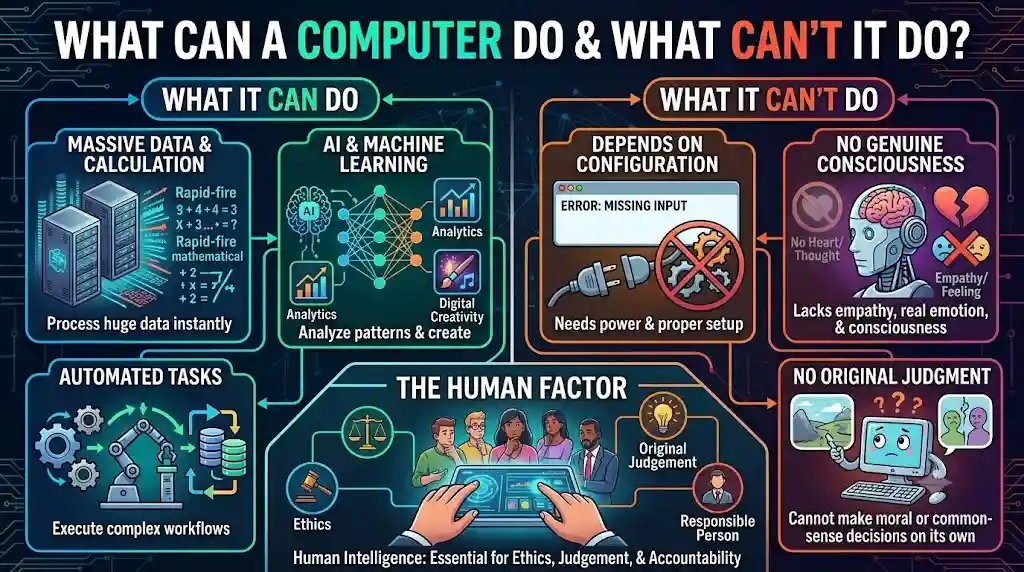
Computers have become an essential part of modern life. They are used in education, business, healthcare, banking, communication, scientific research, entertainment, and many other fields. From performing simple calculations to analyzing enormous amounts of data, computers can complete numerous tasks quickly and accurately. With the development of artificial intelligence (AI) and machine learning, their capabilities have expanded even further.
However, despite their remarkable abilities, computers also have limitations. They depend on hardware, software, data, instructions, and programmed systems to perform tasks. Although modern AI systems can generate content, recognize patterns, and solve certain complex problems, they do not possess human emotions, personal experiences, or independent judgment in the same way people do.
Understanding what a computer can and cannot do helps us use technology effectively and recognize the importance of human intelligence.
What Can a Computer Do?
A computer is an electronic device that accepts data, processes it according to instructions, stores information, and produces useful results. Its ability to perform different tasks depends on its hardware, software, available data, and the instructions it receives.
The following are some of the most important things a computer can do.
1. Process Large Amounts of Data
One of the most important capabilities of a computer is its ability to process large amounts of data in a short period. It can collect, organize, compare, sort, and analyze information much faster than a human performing the same repetitive tasks manually.
For example, computers are used by banks to process transactions, schools to manage student records, hospitals to maintain patient information, and businesses to analyze sales data.
This capability makes computers especially useful in situations where large volumes of information must be handled efficiently.
2. Perform Complex Calculations
Computers can perform millions or billions of arithmetic and logical operations per second, depending on their hardware and workload. They are capable of solving mathematical problems, calculating financial results, running scientific simulations, and processing complex equations.
Scientists use powerful computers to study weather patterns, model physical systems, analyze astronomical observations, and conduct engineering research.
However, the accuracy of a calculation depends on the correctness of the input data, the instructions, and the computational method being used.
3. Store and Retrieve Information
Computers can store large quantities of information on hard disk drives, solid-state drives, memory cards, and other storage devices. They can retain documents, photographs, videos, music, databases, and software for later use.
When information is needed, a computer can retrieve it quickly through searches, file systems, and database applications.
For example, a student can save study notes on a computer and access them whenever required. Similarly, a company can maintain years of business records in digital form.
The amount of information a computer can store depends on its storage capacity and the available storage technology.
4. Execute Instructions Automatically
Computers can perform tasks automatically by following a sequence of predefined instructions. Once a suitable program is created and configured, it can execute repetitive operations with little or no continuous human intervention.
Examples include generating monthly reports, calculating employee salaries, backing up files, processing online orders, and sending scheduled notifications.
Automation saves time, reduces repetitive work, and improves consistency. Nevertheless, automated systems may produce incorrect results if their instructions, settings, or input data are faulty.
5. Communicate and Share Information
Computers allow people to communicate and exchange information across the world through the internet and other networks.
They support email, instant messaging, video conferencing, social media, online collaboration, and file sharing. People can attend virtual classes, participate in meetings, publish articles, and communicate with colleagues regardless of geographical distance.
Computers also connect different systems, allowing organizations to exchange data and coordinate their activities efficiently.
6. Run Different Types of Software
A computer can perform many different tasks by running appropriate software. Software provides instructions that tell the hardware what operations to carry out.
For example:
- Word processors are used to create and edit documents.
- Spreadsheet applications are used for calculations and data analysis.
- Graphic design software is used to create illustrations and visual content.
- Video editing applications are used to edit and produce videos.
- Web browsers are used to access websites and online services.
- Programming tools are used to develop applications and websites.
- Database systems are used to organize and manage information.
This flexibility allows the same computer to serve as a learning device, office workstation, entertainment system, or development machine.
7. Display Text, Images, Audio, and Video
Computers can process and present information in different formats. They display text and images on screens, play audio through speakers, show videos, and produce printed documents through printers.
Modern computers can also edit photographs, mix music, create animations, produce films, and support digital publishing.
These capabilities make computers valuable tools for education, journalism, entertainment, advertising, photography, and creative industries.
8. Control Machines and Industrial Systems
Computers are widely used to control machines and monitor industrial processes. They can receive information from sensors, evaluate programmed conditions, and send commands to connected equipment.
Examples include automated manufacturing systems, traffic control systems, industrial robots, and temperature regulation systems.
In healthcare, computers also support medical imaging, laboratory equipment, patient monitoring, and other diagnostic or operational processes.
Such applications can improve productivity, precision, and safety when they are properly designed, tested, and maintained.
9. Support Learning and Education
Computers provide access to digital textbooks, online courses, educational videos, practice tests, virtual laboratories, and interactive learning applications.
Students can research topics, prepare assignments, learn programming, practice languages, and participate in remote classes.
Teachers can use computers to prepare lessons, evaluate assessments, organize student records, and develop digital learning materials.
Computers can make education more accessible, but effective learning still requires attention, understanding, practice, and critical thinking.
10. Perform Repetitive Tasks with Consistency
Computers are particularly effective at repeating the same operation many times. Once a process has been correctly programmed, the computer can perform it repeatedly without becoming bored or losing concentration in the human sense.
For example, a computer can calculate thousands of invoices, check records against predefined rules, or process a large collection of digital files.
This consistency is one of the main reasons computers are widely used in manufacturing, accounting, administration, and data processing.
However, repeating an incorrect instruction can also reproduce the same error many times.
11. Recognize Patterns and Make Predictions
Modern computing systems can identify patterns in data and use them to make predictions. Machine learning enables systems to learn statistical relationships from examples rather than relying exclusively on manually written rules for every situation.
For example, machine learning systems can help detect fraudulent transactions, recommend products, identify objects in images, recognize speech, and estimate future demand.
These predictions are based on available data and learned patterns. They are not guaranteed to be correct, particularly when the data is incomplete, outdated, biased, or different from the conditions the system was trained to handle.
12. Perform Tasks Using Artificial Intelligence
Artificial intelligence has expanded the range of tasks computers can support. AI systems can generate text, summarize documents, translate languages, answer questions, assist with coding, analyze images, and help users explore complex topics.
Some AI systems can also interpret speech, generate images, identify anomalies, and assist with decision-making.
Nevertheless, AI output can contain errors, fabricated information, or misleading conclusions. Human verification remains important, especially when the consequences of an incorrect answer are significant.
What Can’t a Computer Do?
Although computers are powerful and versatile, they have limitations. Some limitations arise from their physical hardware, while others concern the nature of current software, AI systems, and the difference between computational abilities and human experience.
It is important to distinguish between tasks that computers cannot perform at all, tasks they cannot perform reliably, and tasks they can perform only with human guidance or additional technology.
1. Think Exactly Like a Human
Computers can process information, compare alternatives, identify patterns, and solve many problems. However, their operation is fundamentally different from human thinking.
People draw upon personal experiences, cultural understanding, emotions, common sense, and an awareness of their surroundings. Computers generally operate through programmed procedures, mathematical models, learned statistical patterns, and available information.
Advanced AI can imitate certain aspects of human reasoning and communication, but this does not mean it thinks or understands everything in the same way a person does.
2. Experience Human Emotions
Computers can recognize emotional expressions, analyze the tone of a message, and generate responses that sound sympathetic or enthusiastic.
However, there is no established evidence that today’s computers or AI systems experience emotions as humans do. A system that produces emotionally appropriate language is not necessarily feeling happiness, sadness, fear, love, or compassion.
Human emotions involve complex biological, psychological, and social processes. Computers can model aspects of emotional behavior without demonstrating that they have subjective emotional experiences.
3. Exercise Independent Judgment in Every Situation
Computers can support decision-making by analyzing data, applying rules, comparing alternatives, and estimating possible outcomes.
However, making a sound judgment often requires understanding context, considering ethical responsibilities, recognizing uncertainty, and evaluating consequences that may not be represented in the available data.
For example, a computer may help a doctor interpret medical information, but deciding on an appropriate treatment can require clinical expertise, patient preferences, ethical consideration, and professional responsibility.
AI-generated recommendations should therefore be evaluated rather than accepted automatically.
4. Guarantee Correct Results
Computers are often described as highly accurate machines, but they do not guarantee that every result will be correct.
Errors may occur because of incorrect input, defective hardware, software bugs, unsuitable algorithms, inaccurate data, security problems, or improper configuration.
The principle of “Garbage In, Garbage Out” explains that poor-quality input can lead to poor-quality output.
For example, if incorrect figures are entered into a spreadsheet, the computer may calculate a mathematically correct result based on those incorrect figures. The calculation can be accurate while the final answer is still wrong.
5. Solve Every Problem Without Suitable Instructions or Information
A conventional computer program must have instructions that define how a task should be performed. AI systems can handle unfamiliar inputs within their learned capabilities, but they still depend on their design, training, tools, and available information.
A computer cannot reliably solve every possible problem simply because it is powerful. Some problems require information that is unavailable, methods that have not been developed, or resources that exceed practical limits.
For instance, a computer cannot produce a dependable scientific conclusion from insufficient evidence merely by processing the evidence faster.
6. Possess Human Intuition and Common Sense in the Same Way People Do
Human intuition often develops through experience, observation, practical knowledge, and subconscious processing. People can sometimes make reasonable judgments in unfamiliar situations without explicitly calculating every possibility.
Computers can use heuristics, learned patterns, and contextual information to produce results that resemble intuition. However, they may fail when faced with situations that differ substantially from the examples or assumptions underlying their systems.
Common-sense reasoning remains a challenge for AI because everyday situations contain implicit assumptions and contextual details that people often understand without being directly taught.
7. Understand Every Situation Perfectly
Computers can analyze language, images, sound, and other forms of information, but their interpretations are not always accurate.
For example, an AI system may misunderstand sarcasm, miss cultural references, misinterpret an ambiguous question, or provide an answer that sounds convincing but is factually incorrect.
Human communication often depends on shared experiences, social relationships, background knowledge, and subtle contextual clues. Computers may handle many such situations successfully, but they cannot be assumed to understand every context perfectly.
8. Function Without Electricity or an Appropriate Power Source
Most electronic computers require electricity or another suitable source of power. Without adequate power, they cannot perform their normal electronic operations.
Portable computers can operate using batteries, and some specialized systems use alternative power arrangements. Nevertheless, they still require an appropriate energy source.
Power failures, damaged components, overheating, and other physical problems can interrupt computer operations.
9. Perform Physical Tasks Without Suitable Hardware
Software alone cannot carry out every physical activity. A computer generally needs appropriate hardware, sensors, actuators, or connected machinery to interact with the physical world.
For example, software can calculate a robot’s intended movement, but a physical robot needs motors, mechanical components, sensors, and a power supply to move.
Similarly, a computer cannot directly lift an object, repair a broken machine, or manufacture a physical product without suitable equipment and supporting systems.
10. Guarantee Security and Privacy
Computers can use encryption, authentication, access controls, antivirus software, and other security measures to protect information. However, no computer system can be assumed to be completely immune to every threat.
Weak passwords, software vulnerabilities, phishing attacks, misconfigured systems, and human mistakes can expose sensitive data.
Computers also cannot independently guarantee that information will always be handled ethically or privately. Security depends on technical safeguards, responsible practices, organizational policies, and informed human decisions.
11. Replace Every Human Skill or Profession
Computers can automate many activities and assist professionals in different fields. However, many occupations involve a combination of technical knowledge, communication, empathy, creativity, physical coordination, ethical judgment, and responsibility.
For example, teachers do more than present information; they motivate students, recognize learning difficulties, and adapt their teaching methods. Healthcare professionals combine technical expertise with patient care and professional judgment. Artists and writers may draw upon personal experiences, cultural influences, and individual perspectives.
AI can support these activities, but its ability to perform particular tasks does not mean it can completely replace every aspect of the people who perform them.
12. Take Human Responsibility for Its Decisions
A computer can execute an action or recommend a decision, but it does not automatically become morally or legally responsible for the consequences.
Responsibility must be addressed through the people and organizations that design, deploy, operate, and supervise computer systems, according to the applicable laws and circumstances.
For example, if an automated system makes a harmful decision, it is important to investigate how the system was developed, what data it used, how it was deployed, and whether appropriate safeguards were in place.
Human oversight is especially important when computer systems influence healthcare, education, employment, public services, finance, or personal rights.
Difference Between What a Computer Can and Cannot Do
The following table summarizes the major differences between computer capabilities and their limitations.
| What a Computer Can Do | What a Computer Cannot Reliably Do |
|---|---|
| Process large amounts of data quickly | Guarantee that all processed data is accurate |
| Perform complex mathematical calculations | Correctly solve every problem without suitable methods or information |
| Store and retrieve digital information | Preserve data forever without maintenance or suitable safeguards |
| Follow programmed instructions | Guarantee a correct outcome from faulty instructions |
| Automate repetitive activities | Handle every unexpected situation perfectly |
| Recognize patterns in data | Guarantee that every prediction will be correct |
| Generate text, images, and other content using AI | Guarantee that generated content is original in every respect, factual, or appropriate |
| Analyze information to support decisions | Replace sound human judgment in every context |
| Recognize emotional expressions and language patterns | Demonstrate human-like emotional experiences simply by expressing emotions |
| Control machines using suitable equipment | Perform physical actions without the necessary hardware |
| Communicate through digital networks | Guarantee that every communication is secure or private |
| Assist people in many professions | Replace every human skill, relationship, or responsibility |
The Role of Artificial Intelligence in Expanding Computer Capabilities
Artificial intelligence is changing how computers perform tasks. Traditional software often follows explicitly defined rules, while machine learning systems can identify patterns in training data and use those patterns to make predictions or generate outputs.
For example, a conventional program may calculate a total using a specified mathematical formula. A machine learning model may instead analyze thousands of examples to estimate whether a transaction is potentially fraudulent.
Generative AI extends these capabilities by producing text, images, audio, video, and computer code based on patterns learned during training and the context supplied by a user.
These developments allow computers to assist with tasks that previously required substantial human effort. Nevertheless, AI does not eliminate the need for careful evaluation. Models can make mistakes, reflect biases in their data, struggle with unfamiliar situations, and produce plausible-sounding but unsupported answers.
The most effective approach is to combine computer speed and analytical capabilities with human expertise, critical thinking, creativity, and accountability.
Why Human Intelligence Remains Important
Human intelligence remains important because many real-world problems require more than processing information. They may involve values, emotions, social relationships, uncertainty, and consequences that are difficult to express as formal rules.
People can define goals, decide which problems deserve attention, question assumptions, evaluate ethical concerns, and take responsibility for their actions. They can also draw on lived experience and physical interaction with the world.
Computers can strengthen these abilities by providing information, organizing evidence, exploring alternatives, and automating routine work. However, the usefulness of a computer depends on how well it is selected, programmed, supervised, and applied to a particular problem.
Instead of viewing computers and humans as direct competitors in every situation, it is more useful to understand how they can complement one another.
Conclusion
Computers are powerful electronic devices capable of processing data, performing calculations, storing information, communicating across networks, running software, automating tasks, and supporting advanced AI applications. Their speed, consistency, and ability to handle large volumes of information make them valuable in almost every area of modern life.
However, computers also have limitations. They can make mistakes, misunderstand context, generate unreliable predictions, and fail when information or methods are inadequate. Although AI can imitate aspects of human reasoning and emotional expression, this does not establish that computers possess human-like consciousness, feelings, or personal experiences.
The key to using computers effectively is to understand both their capabilities and their limitations. Computers are excellent tools for processing information and supporting human activities, while people remain essential for setting meaningful goals, exercising judgment, considering ethical issues, and taking responsibility.
Ultimately, the best results often come from combining the speed and computational power of computers with human knowledge, creativity, critical thinking, and experience.
FAQs
1. What can a computer do?
A computer can process data, perform calculations, store information, run software, communicate over networks, automate tasks, and support artificial intelligence applications.
2. What can’t a computer do?
A computer cannot guarantee correct results, understand every situation perfectly, or replace human judgment in every context. Current computers also have no established capacity for human-like emotional experiences.
3. Can a computer think like a human?
Computers and AI systems can perform reasoning-like tasks, recognize patterns, and solve complex problems. However, their information processing differs from human thinking and lived experience.
4. Can computers make mistakes?
Yes. Computers can produce incorrect results because of faulty input data, software bugs, hardware failures, unsuitable algorithms, or errors in AI-generated outputs.
5. Can a computer work without human instructions?
Traditional computers generally follow programmed instructions. AI-powered systems can handle varied tasks and respond to new inputs, but they still depend on their design, data, objectives, and operating conditions.
6. Can artificial intelligence replace human intelligence?
AI can automate specific tasks and assist with problem-solving, writing, analysis, and prediction. However, it does not replace every human capability, including personal experience, ethical responsibility, and human relationships.
7. Why are computers important in everyday life?
Computers make information processing faster, simplify repetitive tasks, support communication, improve productivity, and provide access to education, entertainment, business tools, and digital services.