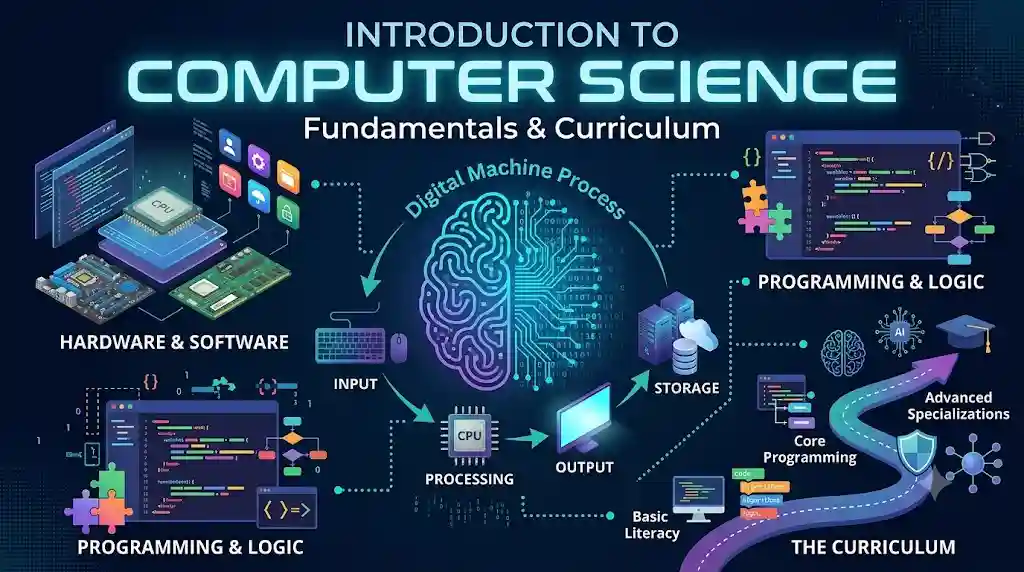
Introduction to Computer Science and Curriculum
Computer science is one of the most important fields of the modern digital world. It influences how we communicate, learn, work, conduct business, solve problems, and interact with technology. From smartphones and websites to artificial intelligence and advanced scientific systems, computer science provides the fundamental knowledge required to understand and develop digital solutions.
An introduction to computer science begins with understanding what a computer is, how it works, what it can accomplish, and how humans communicate instructions to it. It also introduces essential programming terminology, software concepts, and the basic principles behind creating computer programs. These foundations help learners develop computational thinking and prepare them for further study in programming, software development, web development, data science, and other technology-related fields.
What Is Computer Science?
Computer science is the systematic study of computers, computational processes, algorithms, programming languages, software systems, and information processing. It focuses on understanding how computers solve problems and how they can be designed, programmed, and used to perform useful tasks.
Computer science is not limited to learning how to operate a computer. It also involves understanding the logic behind computer operations, designing efficient solutions, organizing information, and developing instructions that machines can execute.
For example, when a person uses a search engine, the computer processes the search query, examines relevant information, and displays results. Similarly, when someone purchases a product online, computer systems manage product details, customer information, payment processing, and order records. Computer science provides many of the principles and techniques used to build these systems.
Some major areas of computer science include:
- Programming: Writing instructions that computers can execute.
- Algorithms: Developing step-by-step procedures for solving problems.
- Data structures: Organizing and storing information efficiently.
- Software engineering: Designing, developing, testing, and maintaining software applications.
- Computer networks: Understanding how computers communicate and share information.
- Cybersecurity: Protecting computer systems, networks, and data from unauthorized access and attacks.
- Artificial intelligence: Developing systems capable of performing tasks that typically require human intelligence.
- Database systems: Storing, managing, retrieving, and organizing digital information.
Understanding these areas begins with learning the fundamental concepts of computers and their capabilities.
What Is a Computer?
A computer is an electronic device that accepts data as input, processes it according to a set of instructions, stores information when required, and produces meaningful results as output.
Computers perform these operations at high speed and can handle large amounts of information with considerable accuracy when given correct instructions and data. They are used in education, healthcare, banking, transportation, scientific research, entertainment, communication, and countless other fields.
A computer generally performs four fundamental functions:
1. Input
Input is the process of entering data and instructions into a computer. Input devices allow users to communicate information to the system.
Common input devices include keyboards, mice, microphones, scanners, cameras, and touchscreens.
For example, when a student types a mathematical expression into a computer, the keyboard provides the input.
2. Processing
Processing refers to the operations performed on input data to transform it into useful information. The central processing unit (CPU) executes program instructions and performs calculations, comparisons, and other operations.
For instance, when a user enters two numbers into a calculator application, the computer processes those numbers according to the selected mathematical operation.
3. Output
Output is the information produced by a computer after processing data. Output devices present the results in a form that users can understand.
Examples include monitors, printers, speakers, and projectors.
When a computer calculates the sum of two numbers and displays the answer, the displayed result is the output.
4. Storage
Storage allows a computer to retain data, instructions, and results for future use. Information may be stored temporarily while a program is running or permanently until it is deleted or the storage device fails.
Examples of storage devices include solid-state drives (SSDs), hard disk drives (HDDs), USB flash drives, and memory cards. Random access memory (RAM) provides temporary working storage for programs and data currently in use.
Together, input, processing, output, and storage form the foundation of how computers perform useful tasks.
What Can Computers Do?
Computers can perform a wide variety of tasks depending on their hardware, software, and the instructions they receive. Their flexibility makes them valuable tools for individuals, businesses, governments, researchers, and educational institutions.
Data Processing and Calculation
Computers can perform mathematical calculations, analyze large datasets, compare values, and organize information. They are widely used in accounting, scientific research, engineering, financial analysis, and statistical studies.
Communication
Computers enable people to communicate through email, messaging applications, video conferencing, social networks, and online collaboration platforms. Computer networks and internet technologies make it possible to exchange information across geographical boundaries.
Information Storage and Retrieval
Computers can store enormous quantities of information and retrieve specific records when needed. Libraries, hospitals, schools, banks, and businesses use computer systems to manage documents, customer records, research data, and other information.
Automation
Computers can automate repetitive tasks by executing predefined instructions. For example, software can generate reports, calculate salaries, process online orders, schedule activities, and send notifications without requiring a person to perform every individual step manually.
Education and Research
Computers support online learning, digital libraries, simulations, virtual laboratories, educational software, and scientific experiments. They also help learners develop technical skills and access educational resources from different parts of the world.
Creativity and Digital Production
Computers are widely used for graphic design, photography, video editing, music production, animation, writing, and website development. Specialized software enables users to create, edit, publish, and distribute digital content.
Artificial Intelligence and Intelligent Systems
Modern computer systems can perform tasks such as recognizing images, processing human language, identifying patterns, generating content, and assisting with decision-making. These capabilities depend on algorithms, data, computational resources, and the design of the system.
Despite their capabilities, computers have limitations. They do not automatically understand every instruction as a human would. Their results depend on the quality of their data, programs, hardware, and operating conditions. Incorrect instructions or unreliable input can produce incorrect results.
How Do Humans Communicate with Computers?
Computers require instructions expressed in forms they can interpret and execute. Humans communicate with computers through input devices, graphical interfaces, command-line interfaces, programming languages, and other software tools.
Understanding these communication methods is an essential part of introductory computer science.
Graphical User Interface (GUI)
A graphical user interface allows users to interact with a computer through visual elements such as windows, icons, buttons, menus, and pointers.
Desktop operating systems, mobile applications, and many websites use graphical interfaces because they make common operations easier to understand and perform.
For example, opening a document by clicking its icon is an example of interaction through a graphical user interface.
Command-Line Interface (CLI)
A command-line interface allows users to communicate with a computer by typing text commands into a terminal or command prompt.
This method is particularly useful for developers, system administrators, and technical professionals who need to manage files, execute programs, automate operations, or configure computer systems.
For example, a user may enter a command to display files in a directory or run a software development tool.
Programming Languages
Programming languages provide structured ways to write instructions that computers can execute, either directly through an appropriate runtime or after translation into a suitable executable form.
Languages such as Python, Java, C, C++, and JavaScript are used for different types of software development. Some are especially popular for automation, data analysis, system programming, mobile applications, or web development.
Programming languages enable developers to express calculations, conditions, repetition, data manipulation, and complex logical operations.
Natural Language and Voice Interfaces
Some computer systems allow users to interact through spoken language or written questions. Voice assistants, conversational applications, and natural-language processing systems interpret human communication and respond according to their capabilities.
However, natural-language interfaces do not eliminate the need for technical understanding. Their responses may contain errors, and users should verify important information.
Understanding Programming
Programming is the process of designing, writing, testing, and maintaining instructions that enable a computer to perform specific tasks. These instructions are organized into programs, which may be small utilities or complex applications.
Programming requires more than memorizing commands. It involves understanding a problem, developing a logical solution, expressing that solution in a programming language, and checking whether the resulting program behaves as expected.
A typical programming process includes the following stages:
- Problem identification: Clearly define the task that needs to be solved.
- Solution design: Develop a logical approach to solving the problem.
- Algorithm development: Describe the solution as a sequence of steps.
- Coding: Translate the solution into a programming language.
- Testing: Check whether the program produces the expected results.
- Debugging: Identify and correct errors in the program.
- Maintenance: Update the software, fix problems, and improve its functionality over time.
Consider a simple program that calculates the total price of two products. The program receives two prices, adds them together, and displays the total. Although this task is straightforward, it demonstrates the basic relationship between input, processing, and output.
Learning programming gradually helps students develop logical reasoning, accuracy, patience, and problem-solving skills.
Essential Programming Terminology
A strong understanding of programming terminology makes it easier to learn programming languages and interpret technical documentation.
Program
A program is a set of instructions designed to perform a particular task or a collection of related tasks. Programs can range from simple calculators to operating systems and large business applications.
Source Code
Source code is the human-readable text written in a programming language. Developers create source code using code editors or integrated development environments (IDEs).
For example, a short Python program may contain instructions to add two numbers and display the result.
Syntax
Syntax refers to the rules governing how instructions must be written in a programming language. A syntax error occurs when code violates those rules.
For example, a programming language may require parentheses, quotation marks, or a colon in particular locations. Omitting a required symbol can prevent the program from running correctly.
Variable
A variable is a named reference used to store or access a value in a program. Variables help programs work with information that may change during execution.
For example, a variable named age might contain the value 20.
Data Type
A data type describes the kind of value represented by data and the operations that can be performed on it. Common data types include integers, floating-point numbers, strings, and Boolean values.
- Integer: A whole number, such as
25. - Float: A number containing a fractional component, such as
12.5. - String: Text, such as
"Computer Science". - Boolean: A logical value, typically
TrueorFalse.
Exact type names and rules vary between programming languages.
Operator
An operator performs an operation on one or more values. Arithmetic operators include addition (+), subtraction (-), multiplication (*), and division (/).
Other operators compare values or combine logical conditions.
Expression
An expression is a combination of values, variables, operators, and sometimes function calls that produces a value.
For example, 10 + 5 is an arithmetic expression whose result is 15.
Statement
A statement is an instruction that performs an action, such as assigning a value, calling a function, or controlling program flow.
Conditional Statement
A conditional statement allows a program to make decisions based on whether a condition is true or false. Common conditional structures include if, else, and elif in Python.
For example, a program may check whether a student’s marks meet the minimum passing requirement before displaying a result.
Loop
A loop repeats a block of instructions while a specified condition holds or for each item in a sequence. Loops reduce repetition and make programs more efficient to write and maintain.
Common loop structures include for and while loops.
Function
A function is a reusable block of code designed to perform a particular task. Functions help divide large programs into smaller, manageable components.
For example, a function may calculate the area of a rectangle using its length and width.
Algorithm
An algorithm is a finite, clearly defined sequence of steps for solving a problem or completing a task. Algorithms can be expressed in plain language, flowcharts, pseudocode, or programming languages.
Bug and Debugging
A bug is an error or defect that causes a program to behave incorrectly or unexpectedly. Debugging is the process of finding, understanding, and correcting such problems.
Compiler and Interpreter
A compiler translates source code into another form, often machine code or an intermediate representation. An interpreter executes program instructions through a runtime that processes the code.
The exact distinction depends on the programming language and implementation. Some languages use a combination of compilation and interpretation.
API
An application programming interface (API) defines how software components communicate and access one another’s functionality. APIs allow developers to integrate services, retrieve data, and build applications that work together.
Database
A database is an organized collection of information that can be stored, searched, updated, and managed using appropriate software. Databases are widely used in websites, educational systems, banking applications, and business platforms.
Understanding Software Concepts
Software is a collection of programs, instructions, and related components that tell a computer how to perform tasks. It provides the functionality that makes computer hardware useful.
Computer software is commonly divided into three broad categories: system software, application software, and programming software.
System Software
System software manages computer hardware and provides essential services for other programs.
An operating system is one of the most important examples. Operating systems manage memory, files, processes, input and output devices, and access to system resources.
Examples include Microsoft Windows, macOS, Linux distributions, Android, and iOS.
Other forms of system software include device drivers and certain system utilities.
Application Software
Application software helps users perform specific tasks. It may be designed for general use or for a particular professional purpose.
Examples include:
- Word processors for creating and editing documents.
- Spreadsheet applications for calculations and data analysis.
- Web browsers for accessing websites.
- Image editors for modifying photographs and graphics.
- Media players for playing audio and video.
- Accounting applications for managing financial records.
- Educational applications for teaching and learning.
- Content management systems for publishing and managing website content.
Application software makes it possible to use computers for practical activities without manually programming every operation.
Programming Software
Programming software consists of tools used to create, test, debug, and maintain other software.
Examples include code editors, compilers, interpreters, debuggers, build tools, and integrated development environments.
An IDE combines several development tools into a single environment, helping programmers write code, inspect errors, run programs, and manage projects.
Firmware
Firmware is specialized software stored in or associated with a hardware device. It provides low-level instructions that help the device operate.
Firmware is commonly found in routers, printers, embedded systems, and many electronic devices. It helps coordinate hardware operations and may be updated to improve functionality or address security issues.
The Relationship Between Hardware and Software
Hardware and software are two essential parts of a computer system.
Hardware refers to the physical components that can be touched, including the CPU, motherboard, RAM, storage devices, keyboard, monitor, and network adapters.
Software consists of the instructions and programs that control or use those components.
Hardware performs physical operations, while software provides instructions that guide those operations. Neither is sufficient for most general-purpose computing tasks on its own. A computer needs suitable hardware to execute programs, and software needs an appropriate hardware environment to run.
For example, a web browser is software, while the computer’s processor, memory, display, and network adapter provide hardware resources that help it function.
Understanding this relationship helps learners recognize why software requirements, hardware capabilities, compatibility, and system performance are important.
Introduction to Operating Systems
An operating system is system software that manages computer resources and provides an environment in which applications can run. It acts as an intermediary between application programs, users, and hardware.
The major responsibilities of an operating system include:
- Process management: Coordinating the execution of programs and processes.
- Memory management: Allocating and managing working memory.
- File management: Organizing files and directories.
- Device management: Coordinating communication with hardware devices.
- User interaction: Providing graphical or command-line interfaces.
- Security and access control: Helping manage user permissions and protect system resources.
- Resource allocation: Distributing processing time, memory, and other resources among competing tasks.
Operating systems make computers easier to use by handling many complex operations behind the scenes.
Introduction to Data and Information
Data refers to raw facts, observations, measurements, or symbols that can be processed by a computer. Information is data organized or interpreted in a way that provides meaning or supports understanding.
For example, the numbers 75, 82, and 91 are data. When these numbers are identified as a student’s marks in three subjects and analyzed to calculate the average, they become meaningful information.
Computers process many forms of data, including text, numbers, images, audio, and video. At the hardware level, digital computers represent information using binary digits, known as bits, which have values of 0 or 1.
Eight bits commonly form one byte. Larger quantities of digital information are measured using units such as kilobytes, megabytes, gigabytes, and terabytes. The precise interpretation of these units can depend on whether decimal or binary measurement conventions are used.
Learning about data representation helps students understand file sizes, memory usage, storage capacity, and how computers manipulate different kinds of information.
Introduction to Computational Thinking
Computational thinking is a structured approach to solving problems by applying concepts commonly used in computer science. It is useful not only for programmers but also for students, researchers, educators, and professionals working in many fields.
Four important elements of computational thinking are:
Decomposition
Decomposition means breaking a complex problem into smaller, manageable parts.
For example, developing a website can be divided into designing the layout, creating pages, preparing content, implementing navigation, testing functionality, and publishing the site.
Pattern Recognition
Pattern recognition involves identifying similarities, repeated structures, or trends that can help simplify a problem.
For instance, a programmer may recognize that several sections of a website use the same layout and create a reusable component instead of writing the same code repeatedly.
Abstraction
Abstraction means focusing on important details while ignoring unnecessary complexity.
A user of a calculator application does not need to understand every electronic operation inside the processor to perform a calculation. The interface hides those details and presents the functionality required by the user.
Algorithmic Thinking
Algorithmic thinking involves designing a logical sequence of steps to reach a desired result.
For example, a student calculating an average can add all the marks, count the subjects, and divide the total by the number of subjects. This procedure represents an algorithm.
Together, these principles help learners approach unfamiliar problems systematically and develop solutions that are easier to understand, test, and improve.
Introduction to the Computer Science Curriculum
A computer science curriculum organizes learning into progressive stages, beginning with basic concepts and moving toward programming, software development, and more advanced technical topics.
The exact curriculum varies by institution, course duration, and learning objectives. However, an introductory curriculum commonly covers the following subjects.
1. Fundamentals of Computers
This section introduces the definition, characteristics, capabilities, and limitations of computers. Learners explore the basic input-process-output-storage model and become familiar with common computer components.
2. Computer Hardware and Software
Students learn about processors, memory, storage devices, input and output devices, operating systems, applications, and the relationship between physical components and software instructions.
3. Introduction to Programming
This section introduces programming concepts, source code, syntax, variables, data types, operators, expressions, and basic input and output operations.
Learners begin writing simple programs and gradually develop an understanding of how instructions are executed.
4. Algorithms and Problem-Solving
Students learn to analyze problems, design step-by-step solutions, represent algorithms using pseudocode or flowcharts, and evaluate whether a solution produces the intended result.
5. Control Structures
This section explains sequential execution, conditional decisions, and repetition through loops. These structures enable programs to perform different operations depending on input and conditions.
6. Functions and Modular Programming
Learners explore functions, parameters, return values, and code reuse. They also learn how dividing a program into smaller components can improve organization, readability, and maintenance.
7. Data and Information Management
This topic introduces data types, data representation, files, basic information organization, and introductory database concepts. Depending on the course, it may also cover data structures.
8. Introduction to Operating Systems
Students examine the purpose of operating systems, process management, memory management, file systems, device management, and user interfaces.
9. Software Development and Testing
This section introduces the software development process, debugging, testing, documentation, version control, and maintenance. Students learn that successful software development involves more than writing code.
10. Introduction to Networks and the Internet
Learners explore computer networks, internet connectivity, web browsers, servers, client-server communication, websites, and basic online security concepts.
11. Practical Projects
Practical work allows students to apply theoretical knowledge to real-world problems. Beginner projects may include a calculator, a number-guessing game, a student marks calculator, a simple personal website, or a basic record-management application.
12. Further Learning and Specialization
After mastering the fundamentals, students can explore areas such as web development, mobile application development, cybersecurity, artificial intelligence, data science, cloud computing, and software engineering.
A well-designed curriculum balances conceptual understanding, practical exercises, problem-solving activities, and independent learning.
Practical Example: Creating a Simple Program
One of the best ways to understand programming is to begin with a small, practical example. The following Python program asks the user for two numbers, calculates their sum, and displays the result.
num1 = float(input("Enter the first number: "))num2 = float(input("Enter the second number: "))total = num1 + num2print("The sum is:", total)
This program demonstrates several fundamental concepts:
input()accepts information from the user.float()converts the entered text into a numeric value.num1andnum2are variables that hold the numbers.- The
+operator adds the values. - The variable
totalstores the result. print()displays the output.
If the user enters 10 and 20, the program displays the sum as 30.0.
This example demonstrates the relationship between input, processing, storage in variables, and output. It also introduces basic syntax and data conversion.
As learners progress, they can extend the program by checking for invalid input, calculating averages, performing other mathematical operations, and organizing the code into functions.
Why Is an Introduction to Computer Science Important?
Learning the fundamentals of computer science provides a foundation for understanding the technologies used in everyday life. It also prepares learners to develop practical digital skills and pursue further technical education.
The major benefits include:
Improved problem-solving skills: Computer science encourages learners to analyze problems, identify possible solutions, and approach tasks logically.
Programming knowledge: Introductory concepts help learners begin writing programs and understand how software works.
Digital literacy: Understanding hardware, software, operating systems, and the internet helps people use digital tools more effectively.
Career preparation: Computer science fundamentals support further learning in software development, web development, IT support, cybersecurity, data analysis, and other technology-related professions.
Creativity and innovation: Programming and computational thinking enable learners to transform ideas into working applications, tools, and digital products.
Adaptability: Fundamental knowledge makes it easier to learn new programming languages, development tools, and technologies as the digital environment changes.
Tips for Beginners Learning Computer Science
Beginners can make steady progress by combining theoretical study with regular practical exercises.
- Start with the basics. Understand computers, hardware, software, operating systems, and data before moving to advanced topics.
- Choose one beginner-friendly programming language. Python is often a practical starting point because its syntax is relatively readable.
- Practice regularly. Write small programs rather than relying exclusively on reading explanations.
- Understand the logic. Focus on why a program works instead of memorizing code without understanding it.
- Learn from errors. Read error messages, examine the code, and correct problems systematically.
- Use simple projects. Build calculators, quizzes, number games, and other small applications to apply new concepts.
- Review essential terminology. Familiarity with terms such as variable, algorithm, function, syntax, compiler, and operating system makes technical learning easier.
- Break difficult tasks into smaller parts. Solve each part separately before combining the solutions.
- Document your work. Keep notes about concepts, code examples, mistakes, and solutions.
- Progress gradually. Develop a strong foundation before moving to complex frameworks, advanced algorithms, or specialized technologies.
Consistency and curiosity are more valuable for beginners than trying to learn every concept at once.
Conclusion
An introduction to computer science provides the knowledge needed to understand computers, their capabilities, and the instructions that enable them to perform useful tasks. By learning about input, processing, output, storage, programming languages, software categories, operating systems, and computational thinking, students develop a foundation for understanding modern technology.
The curriculum builds on these fundamentals through algorithms, programming, data management, software development, networking, and practical projects. Each topic contributes to a broader understanding of how computer systems are designed, operated, and improved.
Whether the goal is academic study, competitive examinations, professional development, or independent learning, a clear understanding of computer science fundamentals is an excellent starting point. With regular practice, logical thinking, and a willingness to experiment, beginners can progress from understanding basic computer concepts to creating useful programs and exploring advanced areas of technology.
Frequently Asked Questions (FAQs)
1. What is computer science?
Computer science is the study of computers, algorithms, programming, software systems, and data processing. It focuses on understanding how computers work and how they can be used to solve problems efficiently.
2. What are the fundamental concepts of computer science?
The fundamental concepts include computer hardware, software, input and output, data processing, storage, programming languages, algorithms, data structures, operating systems, and computational thinking.
3. What is the basic curriculum of computer science?
An introductory computer science curriculum typically covers computer fundamentals, hardware and software, programming basics, algorithms, control structures, functions, data management, operating systems, networking, software development, and practical projects.
4. What is the difference between hardware and software?
Hardware refers to the physical components of a computer, such as the CPU, keyboard, monitor, and storage devices. Software consists of programs and instructions that tell the computer how to perform specific tasks.
5. What is programming in computer science?
Programming is the process of writing, testing, and maintaining instructions that enable computers to perform specific tasks. It involves using programming languages such as Python, Java, C++, and JavaScript.
6. What are the four basic functions of a computer?
The four basic functions of a computer are input, processing, output, and storage. These functions allow a computer to accept data, process it according to instructions, produce results, and retain information for future use.
7. Which programming language is best for beginners?
Python is often recommended for beginners because its syntax is relatively simple and readable. It is used in automation, web development, data analysis, artificial intelligence, and many other applications.
8. What is an algorithm?
An algorithm is a finite sequence of clearly defined steps designed to solve a problem or complete a task. Algorithms can be represented using plain language, pseudocode, flowcharts, or programming code.
9. What is the difference between system software and application software?
System software manages computer hardware and provides essential services for other programs. Application software helps users perform specific tasks, such as writing documents, browsing the internet, editing images, or managing data.
10. Why is learning computer science important?
Learning computer science develops problem-solving, logical reasoning, programming, and digital literacy skills. It also provides a foundation for careers and further education in software development, web development, cybersecurity, data science, and information technology.
11. What is computational thinking?
Computational thinking is a problem-solving approach that uses techniques such as decomposition, pattern recognition, abstraction, and algorithmic thinking to develop clear and systematic solutions.
12. Can beginners learn computer science without prior programming knowledge?
Yes. Beginners can learn computer science without prior programming experience. Starting with basic computer concepts, programming terminology, simple algorithms, and small practical exercises helps build the knowledge needed for more advanced topics.